Calendar Procreate Brush Stamp: A Practical Tool for Digital Planners
For digital artists and planner enthusiasts using the iPad, efficiency is often just as important as aesthetics. The Calendar Procreate Brush Stamp represents a specialized tool designed to streamline the creation of monthly layouts within the Procreate app. Rather than drawing grid lines and numbering days manually—a process that can be time-consuming and prone to alignment errors—this brush stamp offers a pre-formatted solution. It allows users to insert complete monthly calendars into their digital journals, planners, or design projects with a single tap.
This article evaluates the utility, functionality, and ideal use cases for this specific digital asset. By understanding its structure and limitations, you can determine whether it aligns with your workflow and design goals.
Understanding the Functionality
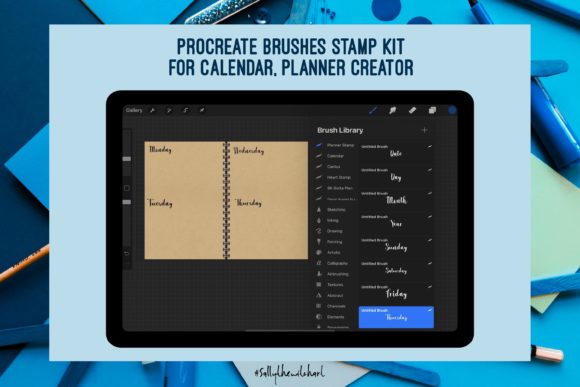
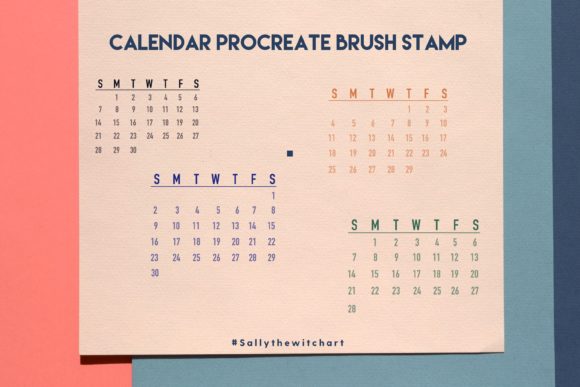
The core value of the Procreate brush stamp – Calendar lies in its simplicity and integration. It is not a standalone application but a custom brush file (.brushset) that imports directly into the Procreate Brush Library. Once installed, it appears alongside your standard pencils, inks, and textures. When selected, tapping the canvas places a pre-designed calendar grid at that location.
A critical feature of this specific tool is its structure. It utilizes a Sunday start format, which is the standard convention for many regions, particularly in North America. The set includes variations for every possible monthly configuration. Since months vary in length (28, 29, 30, or 31 days) and the first day of the month can fall on any day of the week (Sunday through Saturday), the collection comprises a total of 28 unique calendar templates. This comprehensive coverage ensures that regardless of the month or year you are designing for, there is a stamp that matches the correct layout.
Why Consider a Calendar Brush Stamp?
Digital planning has grown significantly in popularity, driven by the flexibility of apps like Procreate, GoodNotes, and Notability. However, creating functional planner pages from scratch requires a balance of artistic skill and structural precision. Here are several reasons why users might evaluate this tool:
- Time Efficiency: Drawing a perfect grid, ensuring equal spacing, and correctly numbering days can take considerable time. A brush stamp reduces this process to seconds.
- Consistency: For users creating annual planners or multiple monthly spreads, maintaining a consistent look and feel is crucial. Using the same stamp ensures uniformity across all pages.
- Error Reduction: Manual entry increases the risk of misaligned dates or incorrect day placements. Pre-made stamps eliminate human error in the structural layout.
- Customization Foundation: The stamp provides a neutral base. Users can easily change colors, add decorative elements, or write over the numbers without worrying about the underlying grid structure.
Benefits and Practical Advantages
The primary benefit of the Calendar Procreate Brush Stamp is the removal of technical barriers to entry for complex layouts. For individuals who enjoy the creative aspects of digital planning—such as lettering, illustration, and color theory—but find geometric precision tedious, this tool bridges the gap. It allows the user to focus on decoration and content rather than construction.
Furthermore, because the file is a digital download with no physical component, it offers immediate accessibility. Once purchased and downloaded, the file can be imported instantly. There are no shipping delays or inventory issues. The lightweight nature of the brush file also means it does not consume significant storage space on your iPad.
Another practical advantage is the flexibility of scale. In Procreate, brush stamps can be resized dynamically. Whether you need a small weekly overview or a large, full-page monthly spread, the same stamp can be adjusted to fit the available canvas space while maintaining clarity.
Tradeoffs and Considerations
While efficient, relying on a brush stamp involves certain tradeoffs that potential users should consider before purchasing.
Fixed Format Limitations
The most significant limitation is rigidity. This specific set uses a Sunday start format. If you prefer a Monday start calendar, which is common in Europe and other parts of the world, this tool will not meet your needs without significant manual modification. Additionally, the aesthetic of the stamp is fixed upon import. While you can change the color, you cannot easily alter the font style or line weight of the numbers without editing the brush source, which requires advanced technical knowledge.
Integration Workflow
Users must be comfortable with the Procreate interface. Importing custom brushes requires navigating the Brush Studio menu. For beginners unfamiliar with Procreate’s file management, there may be a slight learning curve. Additionally, because these are raster-based stamps, resizing them significantly larger than their original design may result in pixelation, although most modern brush sets are optimized to mitigate this.
Digital-Only Nature
It is essential to remember that this is a digital download. There is no physical product. Users expecting a tangible planner or printed stickers will be disappointed. This tool is strictly for use within the digital ecosystem of the iPad and Procreate app.
Ideal Use Cases
The Procreate brush stamp – Calendar is a strong fit for specific types of users and projects:
- Digital Planner Creators: Individuals who sell or share digital planner templates can use these stamps to rapidly prototype and produce monthly pages.
- Personal Journalers: Users who maintain a daily digital journal and want a quick, clean way to track dates without cluttering their creative process.
- Students and Professionals: Those who need functional, legible calendars for scheduling and task management within their digital notes.
- Design Beginners: Artists who struggle with perspective and grid drawing but want their planners to look professional and structured.
When to Consider Alternatives
Despite its benefits, this tool may not be the best choice for everyone. You might consider alternatives if:
- You require a Monday start: Look for brush sets specifically designed with ISO week standards or Monday-start grids.
- You prefer hyper-customization: If you want unique fonts, hand-drawn numbers, or irregular grid shapes, creating your own templates from scratch or using vector-based tools like Adobe Illustrator may offer more control.
- You use different apps: If your primary planning tool is GoodNotes or Notability, ensure that you are comfortable importing Procreate brushes or consider finding native templates for those platforms, although Procreate brushes are generally compatible with other iPad apps that support brush imports.
- You need interactive features: A brush stamp is a static image. It does not include hyperlinks or clickable tabs. If you need an interactive digital planner with navigation links, you will need to build those elements separately or purchase a pre-linked PDF planner.
Making the Decision
Evaluating the Calendar Procreate Brush Stamp comes down to assessing your priority between speed and customization. If your goal is to produce clean, accurate, and consistent monthly layouts with minimal effort, this tool provides excellent value. The inclusion of all 28 possible calendar variations ensures long-term usability, making it a one-time purchase that serves multiple years of planning.
However, if your workflow demands specific aesthetic quirks, non-standard week starts, or interactive digital features, you may find the fixed nature of the brush limiting. For most general users, though, it serves as a reliable foundational element that simplifies the technical side of digital planning, allowing more room for creativity and organization.
Before purchasing, verify that your device meets the requirements (iPad with Procreate) and confirm that the Sunday-start format aligns with your personal or regional preferences. By matching the tool’s capabilities with your specific needs, you can enhance your digital planning experience effectively.