Maximizing Your Digital Workflow with the Procreate Brush Stamp Kit for Planner
Digital planning has revolutionized how we organize our lives, offering flexibility that paper simply cannot match. However, many creators and planners find themselves stuck in a loop of repetitive typing or drawing, which drains creativity and wastes valuable time. This is where a specialized tool like the Procreate Brush Stamp Kit for Planner becomes essential. Designed specifically for the Procreate app on iPad, this kit transforms the tedious task of creating headers, dates, and labels into a seamless, one-tap process. Whether you are building a custom calendar, maintaining a detailed diary, or designing a digital planner for sale, understanding how to leverage these stamps correctly can significantly elevate the quality and efficiency of your work.
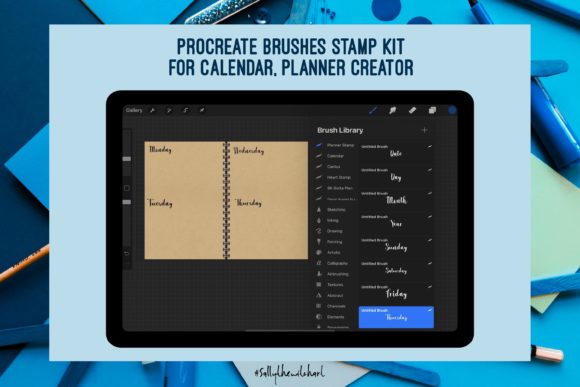
The core appeal of this kit lies in its specific curation for organization. It includes 12 monthly brush stamps, 7 daily brush stamps, and 10 additional utility stamps, all rendered in authentic handwriting fonts. These 29 stamps are contained within a single importable file, ready to integrate directly into your Procreate brush library. Yet, despite the simplicity of the product, users often make avoidable errors that hinder their experience. By recognizing common pitfalls regarding installation, usage, and expectations, you can ensure you get the most out of this digital download.
Avoiding Installation and Compatibility Oversights
One of the most frequent misunderstandings occurs before the user even opens the app. Because this is a digital download with no physical component, some users expect a tangible item or a complex software installer. In reality, the process is straightforward, but it requires attention to detail. A common mistake is attempting to open the downloaded file directly in the Photos app or Files app without routing it correctly to Procreate. If you tap the file and it opens as an image preview, you cannot install it as a brush set.
To avoid this frustration, always ensure you are using the "Share" or "Open In" function on your iPad and explicitly select Procreate from the list of applications. Once selected, Procreate will automatically import the set, and you will see a new category appear in your Brush Library. Another oversight involves device compatibility. This kit is engineered strictly for the Procreate App for iPad. Users attempting to utilize these specific brush stamps on Android tablets or desktop versions of similar art software will find them incompatible. Verifying your hardware and software environment before purchase saves time and prevents disappointment.
Misconceptions About Customization and Flexibility
Once installed, a subtle error many beginners make is treating the stamps as static images rather than dynamic tools. Because the stamps feature handwriting fonts, there is a temptation to think they are rigid and unchangeable. While the text content (e.g., "January" or "Monday") is fixed within the stamp, the color, size, and opacity are fully adjustable. A poor approach is using the default black color for every element, which can make a planner look monotonous and cluttered.
A better strategy is to treat these stamps as design elements. Change the color to match your monthly theme or lower the opacity to create subtle background watermarks. For instance, when creating a weekly spread, use the 7 Days brush stamp in a muted gray for the background structure, then write over it with a different brush for specific appointments. This layering technique adds depth and professionalism to your layout. Furthermore, do not limit these tools to just calendars. The 10 other brush stamps included in the set are versatile; they can serve as section dividers in a journal, headers for a project tracker, or decorative elements in a social media graphic created within Procreate.
Efficiency Traps in Digital Planning
The primary goal of using a Procreate Brush Stamp Kit for Planner is to save time, yet some users inadvertently slow themselves down by over-complicating their workflow. A typical scenario involves spending excessive time searching for the perfect spot to place a stamp, constantly undoing and redoing placement until it is pixel-perfect. While precision is good, perfectionism can kill productivity.
To maintain efficiency, adopt a "draft first, refine later" mindset. Place your month and day stamps quickly to establish the skeleton of your page. Once the structure is down, you can focus on the actual content—your notes, goals, and reflections. Additionally, some users overlook the organizational power of the 12 Months brush stamp series. Instead of creating a new page for every month from scratch, consider designing a master template. Use the stamps to build a reusable yearly overview, then duplicate that page for future years. This approach maximizes the value of the 29 included stamps and ensures consistency across your digital archives.
What to Check Before You Begin
Before diving into your next project, take a moment to evaluate your setup. Ensure your iPad is updated to a version of iOS that supports your current Procreate installation. Check that you have sufficient storage space, although this single file is lightweight, a cluttered device can slow down app performance. Most importantly, clarify your intent. Are you making a personal diary, a client deliverable, or a product to sell?
If you are a small business owner or freelancer creating planners for sale, verify the licensing terms associated with the download. While this kit is excellent for personal use and commercial creation, understanding the boundaries of usage protects your business integrity. For educators and bloggers, these stamps offer a quick way to create visually engaging handouts or tutorial screenshots without needing advanced typography skills.
Ultimately, the Procreate Brush Stamp Kit for Planner is more than just a collection of pre-made text; it is a catalyst for a smoother creative process. By avoiding the traps of incorrect installation, rigid usage, and perfectionist delays, you unlock the true potential of these tools. The handwriting font style adds a personal, human touch to digital pages that standard typed fonts often lack. Whether you are mapping out a year-long calendar or jotting down daily thoughts in a diary, this kit provides the structural foundation you need to focus on what truly matters: your ideas and your organization.
Remember, the transition from physical to digital planning should simplify your life, not complicate it. With the right approach and a clear understanding of how to wield these 29 specialized stamps, you can produce clean, professional, and highly functional layouts in minutes. Embrace the flexibility of the iPad and the power of Procreate to create a planning system that evolves with you.