Unlocking Digital Elegance: A Deep Dive into the Opulence Procreate Letter Brush Palette
There is a specific moment in digital lettering when the stroke feels less like dragging a stylus across glass and more like guiding ink through paper. Achieving that tactile, organic feel on an iPad often requires more than just steady hands; it demands the right tools. This is where the Opulence Procreate Letter Brush palette steps in, offering a hand-created solution designed specifically for artists who crave a glimmering, pressure-sensitive experience without the headache of complex settings.
For creators ranging from freelance graphic designers to hobbyists looking to elevate their digital journaling, the difference between a generic brush and a specialized one like Opulence can define the entire workflow. This isn't just about making lines look pretty; it's about having a tool that responds intuitively to your pressure, allowing for smooth transitions from thick downstrokes to hairline upstrokes. The brush is engineered to feel versatile, meaning you aren't locked into a single look. Whether you are tweaking the size slider for a massive headline or dialing down the opacity for a subtle watermark, the brush maintains its integrity and smoothness.
Where Visual Impact Matters Most
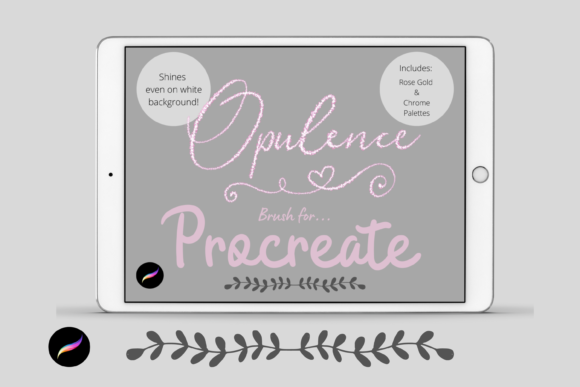
The true value of the Opulence Procreate Letter Brush palette becomes apparent when you consider the environments where your art will live. In today's digital landscape, content is consumed on screens of all sizes, often against varying backgrounds. One of the standout features of this brush is its ability to glow. While many metallic or textured brushes lose their definition against a white canvas, Opulence retains its luminosity. It looks particularly striking against dark backgrounds, making it an ideal choice for creating social media graphics, YouTube thumbnails, or digital invitations meant for evening events.
Imagine a small business owner launching a new line of luxury skincare products. They need promotional materials that scream quality before the customer even reads the price tag. Using the steely chrome or rose gold colors included in the accompanying palettes, they can craft Instagram stories that shimmer as users scroll past. The brush's pressure sensitivity allows for dynamic variation in the lettering, mimicking the look of high-end foil stamping used in physical packaging. This bridges the gap between digital convenience and premium aesthetic, a crucial factor for marketers and entrepreneurs trying to stand out in a crowded feed.
Diverse Applications Across Industries
The versatility of this tool extends far beyond simple social media posts. Educators and course creators, for instance, often struggle to make their digital worksheets or presentation slides feel engaging. Standard fonts can feel sterile, but hand-lettered headers created with the Opulence brush add a personal, human touch that resonates with students. An educator teaching a history module could use the steely chrome effect to highlight key dates or names, adding a layer of visual interest that helps with retention.
Similarly, wedding planners and stationery designers find immense value in the included color palettes. The 60-color selection, featuring nuanced shades of rose gold and chrome, eliminates the time-consuming process of color matching. Instead of hunting for the perfect hex code to match a bride's metallic theme, a designer can instantly access a curated range of tones that work harmoniously. This efficiency is vital for freelancers working under tight deadlines. You can draft a save-the-date card in minutes, knowing the brush will render beautifully whether it's viewed on a phone screen or printed on high-quality cardstock.
Even bloggers and content writers who focus on lifestyle topics can leverage this tool to create unique featured images. A travel blogger writing about a glamorous destination in Dubai could use the brush to overlay elegant typography on their photos, ensuring the text pops without obscuring the scenery. The ability to alter the blend ink charge via the opacity slider means you can soften the effect for a dreamy, ethereal look or crank it up for bold, assertive statements.
Technical Considerations and Setup
Before diving into creation, it is important to understand the ecosystem required to make the Opulence Procreate Letter Brush palette work. This is not a standalone program; it is a specialized asset for the Procreate app on iPad. To utilize this brush effectively, you must have an iPad Pro (or a compatible iPad model) paired with an Apple Pencil. The pressure sensitivity that gives the brush its "smooth feel" relies entirely on the hardware communication between the pencil and the screen. Without the Apple Pencil, you simply cannot access the dynamic range of line weights that define the brush's character.
The installation process also requires a bit of technical know-how, which is a common hurdle for non-tech-savvy creatives. Since the files are delivered digitally, you will need a method to download them to your device, such as iCloud. Furthermore, the files usually come compressed in a ZIP format. This means you will need a utility app like iZip to unzip the folder before you can import it into Procreate. Once unzipped, the file is imported directly into the app, where it sits in a named folder ready for use. While this sounds like a few extra steps, it ensures that the brush data remains intact and functions exactly as the creator intended.
Once installed, the customization options are robust. You aren't stuck with the default settings. If you prefer a heavier ink flow, you can adjust the blend modes. If you need a finer tip for intricate details, the brush resize tool in Procreate allows you to scale the tip without losing resolution. Additionally, if you have already completed a piece of lettering and decide it needs to be larger, the move and resize tool allows you to scale the entire artwork post-creation. This flexibility is essential for professional workflows where client requests often change at the last minute.
Making the Right Choice for Your Workflow
When deciding whether to invest time in learning and using the Opulence Procreate Letter Brush palette, consider your current projects and goals. If you are strictly working in vector-based software like Illustrator for large-scale print, this raster-based brush might not be your primary tool. However, if your output is primarily digital, or if you value the speed and texture of hand-drawn elements, this brush is a powerhouse.
It is also worth noting the learning curve. While the brush is designed to be intuitive, mastering pressure control takes practice. Beginners might find themselves pressing too hard or too lightly initially. However, because the brush is so responsive, it actually serves as a great training tool. It provides immediate feedback on your stroke consistency, helping you develop better muscle memory over time. For seasoned pros, it offers a reliable "go-to" brush that reduces the need for constant tweaking, allowing more focus on composition and message.
Ultimately, tools like the Opulence palette are about removing friction between your idea and the final image. By providing a pre-tuned, glimmering aesthetic that works seamlessly across light and dark modes, it allows creators to focus on what matters most: telling their story with style and precision. Whether you are branding a startup, designing a wedding invitation, or just doodling in your digital sketchbook, the right brush can turn a simple word into a work of art.