Strategic Color Management: Mastering Procreate Hair Color Palettes for Professional Digital Art
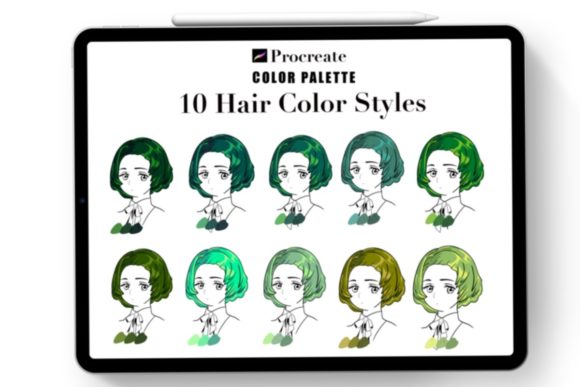
In the realm of digital illustration, color is not merely an aesthetic choice; it is a fundamental component of visual communication and brand identity. For professional artists, illustrators, and content creators, the efficiency of your workflow directly impacts your output quality and client satisfaction. This is where a specialized Procreate Color Palette becomes an essential tool rather than a simple accessory. Specifically, when focusing on character design and portraiture, the complexity of rendering realistic or stylized hair requires a nuanced approach to hue, saturation, and value. Utilizing a curated Hair Color system allows creators to bypass the tedious trial-and-error phase of color selection, enabling them to focus on form, lighting, and narrative impact.
The strategic adoption of a dedicated palette, such as the Hair Shades color palette Vol 2, offers more than just convenience. It provides a structured framework for decision-making. When you remove the cognitive load of searching for the perfect shade of violet or Auburn, you free up mental resources for higher-level creative problems. This article explores how integrating these specific tools into your workflow can enhance productivity, ensure consistency, and elevate the final quality of your digital artwork.
The Strategic Value of Curated Color Systems
Many emerging digital artists underestimate the power of limitation. While Procreate offers millions of color possibilities, unrestricted access often leads to decision paralysis. A curated Procreate Color Palette acts as a guardrail, guiding your choices toward harmonious results. By limiting your options to thirty carefully selected colors, you force yourself to master blending and value control rather than relying on endless hue shifts.
From a business perspective, consistency is key to building a recognizable style. Whether you are an entrepreneur creating assets for your brand, a freelancer delivering commissions, or an educator teaching digital art, having a standardized approach to common elements like hair ensures that your work remains cohesive across different projects. This consistency builds trust with clients and audiences, who come to recognize the quality and signature look of your output. The Hair Shades color palette Vol 2 is designed with this consistency in mind, offering a range that covers natural tones to vibrant fantasies, ensuring versatility without sacrificing harmony.
Deconstructing Purple Hair Tones and Complex Blending
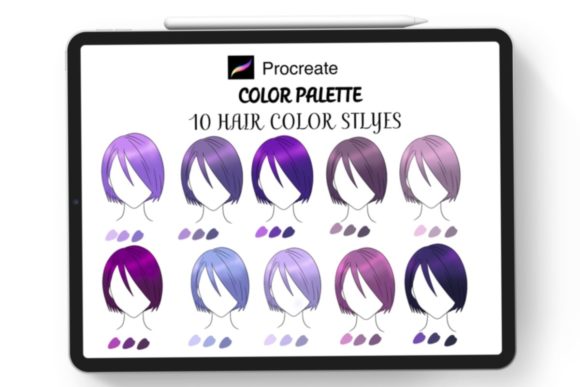
One of the most challenging aspects of digital painting is rendering non-natural hair colors, particularly Purple Hair tones. Purple is notoriously difficult to manage because it sits on the boundary between warm and cool spectrums. Without a proper guide, purple hair can easily appear flat, muddy, or disconnected from the lighting environment. This is where the specific curation of the Procreate color palette proves its worth.
The included thirty colors are not random; they are sequenced to facilitate natural Hair blending. Effective blending relies on the subtle transition between shadows, mid-tones, and highlights. In the context of purple hair, this means moving from deep, desaturated indigos in the shadow areas to vibrant magentas or lavenders in the light-struck zones. A poorly constructed palette might jump too abruptly between these values, resulting in banding or unnatural contrasts. By using a palette derived from extensive sketchbook experimentation, the transitions are smoothed out, allowing for a painterly approach that mimics the way light interacts with keratin strands.
Furthermore, understanding the temperature shifts within purple tones is critical. Realistic hair reflects its environment. A strategic artist uses the palette to introduce cooler blues in the shadows and warmer pinks or yellows in the highlights, depending on the light source. The Hair Shades color palette Vol 2 accounts for these nuances, providing the necessary variations to create depth and volume. This level of detail transforms a simple color fill into a three-dimensional element that anchors the character in their space.
Operational Efficiency: From Download to Creation
Time is a finite resource for any creator. The operational benefit of using a pre-made .swatch file cannot be overstated. The process of manually sampling colors from references or mixing them from scratch for every new piece is inefficient and prone to error. By downloading the provided zip file, which includes the .swatch file and a JPG guide, you integrate a professional-grade tool into your ecosystem instantly.
The implementation is straightforward yet impactful. After downloading, you open the file in Procreate, and the palette is immediately available at your fingertips. This immediacy reduces friction in the creative process. When inspiration strikes, you are not delayed by technical setup. For professionals managing multiple deadlines, this reduction in setup time accumulates significantly over weeks and months. It allows for rapid iteration, enabling you to test different hair styles and color variations quickly before committing to a final render.
The inclusion of a JPG file detailing "How to use this Procreate color palette" serves as an onboarding document. It ensures that even users new to Procreate’s import functions can integrate the tool without frustration. This attention to user experience reflects a broader principle in digital asset creation: tools should be intuitive. When tools are easy to use, adoption rates increase, and the likelihood of consistent application rises.
Risks of Unintentional Color Usage
While a high-quality palette is a powerful asset, it is not a substitute for artistic judgment. Relying blindly on any Procreate Color Palette without understanding color theory can lead to generic or contextually inappropriate results. For instance, using vibrant Purple Hair tones in a scene with warm, sunset lighting may clash if the artist does not adjust the saturation or value to match the ambient light. The palette provides the ingredients, but the artist must cook the meal.
Another risk is over-standardization. If every character you draw uses the exact same blending technique derived from the palette, your work may begin to feel repetitive. To mitigate this, use the palette as a foundation, not a ceiling. Experiment with opacity settings, blending modes, and texture brushes to vary the application. The goal is to use the Hair Color system to accelerate your workflow, not to dictate your creative voice. Strategic use involves knowing when to deviate from the palette to serve the specific narrative or emotional tone of a piece.
Planning and Positioning Your Artwork for Success
For entrepreneurs and marketers, visual assets are crucial for positioning. The quality of your illustrations communicates professionalism. Using a refined Hair Shades color palette Vol 2 signals attention to detail. When clients see complex, well-blended hair textures, they perceive a higher value in the overall artwork. This perception can justify higher pricing tiers and attract more discerning clientele.
Moreover, thoughtful color planning supports long-term branding. If you are developing a series of characters or a comic, maintaining consistent hair colors across different panels and episodes is vital for reader recognition. A standardized palette ensures that a character’s hair looks the same in Chapter 1 as it does in Chapter 10, regardless of when those pages were drawn. This continuity is essential for immersive storytelling and professional presentation.
To maximize the utility of this tool, consider integrating it into your pre-production phase. Before starting a sketch, review the thirty colors available. Decide which subset aligns with the character’s personality and the scene’s mood. Plan your light source and determine which shades will serve as shadows and which as highlights. This proactive approach prevents mid-process corrections and ensures a more polished final result.
Conclusion: Intentionality in Digital Creation
The transition from amateur to professional digital artist is often marked by the shift from chaotic experimentation to intentional systems. A specialized Procreate Color Palette for hair is one such system. It encapsulates expertise and experience into a usable format, allowing you to leverage proven color relationships in your own work. By understanding the strategic value of these tools, mastering the nuances of Purple Hair tones and blending, and integrating the workflow efficiently, you position yourself for greater creative success.
Remember, the tool is only as effective as the strategy behind it. Use the Hair Shades color palette Vol 2 to streamline your operations, enhance your visual communication, and deliver consistent, high-quality results. In doing so, you transform a simple set of digital swatches into a cornerstone of your professional practice.