Mandala Procreate Brush Stamps Set: A Practical Guide for Digital Creators
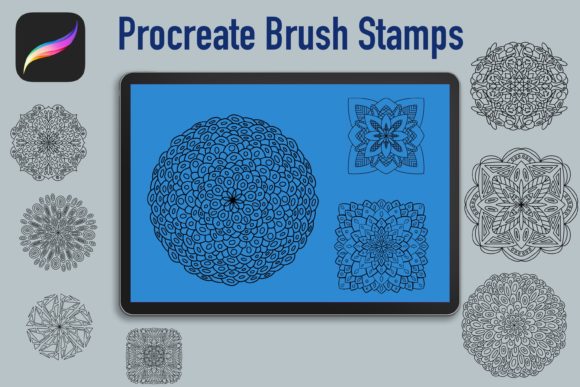
Digital art and design have evolved rapidly, offering tools that streamline creativity without sacrificing quality. Among these tools, the Mandala Procreate Brush Stamps Set has emerged as a valuable resource for artists, planners, and entrepreneurs alike. This specific collection features ten unique, hand-drawn mandalas designed to integrate seamlessly into your workflow within the Procreate app. Whether you are designing digital products, decorating a bullet journal, or creating interiors for Kindle Direct Publishing (KDP), understanding how to leverage these assets correctly can significantly impact your final output.
Many users approach digital brush sets with high expectations but limited technical knowledge. This gap often leads to frustration, wasted time, and subpar results. By addressing common misconceptions and practical pitfalls early, you can ensure that your investment in this tool yields professional-grade outcomes. The goal is not just to own the brushes, but to master their application in a way that enhances efficiency and aesthetic appeal.
Understanding the Utility of Hand-Drawn Mandala Stamps
Before diving into usage strategies, it is essential to clarify what this product actually is. The Mandala Procreate Brush Stamps Set is not a standard painting brush that creates strokes as you drag your stylus. Instead, it is a stamping tool. Each tap places a pre-rendered, high-resolution image of a mandala onto your canvas. This distinction is critical because it changes how you interact with the tool. You are not drawing the mandala; you are placing it.
This set includes ten distinct designs, each hand-drawn to retain an organic, authentic feel. This organic quality is particularly valuable in an era where digital perfection can sometimes feel sterile. For creators working on personal digital products, such as printable planners or greeting cards, these stamps offer a quick way to add intricate detail without spending hours drawing complex geometric patterns from scratch. For KDP authors, they provide ready-made elements for coloring book interiors, allowing for faster production cycles while maintaining artistic integrity.
Common Mistakes and How to Avoid Them
Even with high-quality assets, user error can diminish the value of the tool. Below are frequent issues encountered by beginners and experienced users alike, along with corrective advice to optimize your workflow.
Misunderstanding Resolution and Scaling
One of the most prevalent mistakes involves scaling. Users often assume that because the stamp looks crisp when first placed, it will remain sharp at any size. This is incorrect. While the stamps are high-resolution, enlarging them beyond their intended dimensions can result in pixelation or blurriness. This is particularly detrimental if you plan to print your designs large, such as for poster-sized coloring pages.
The Fix: Always check the native resolution of the stamp before scaling. In Procreate, you can monitor the DPI (dots per inch) of your canvas. For print-ready projects, ensure your canvas is set to at least 300 DPI. If you need a larger mandala, it is better to start with a larger canvas size rather than stretching a small stamp. Test print a sample at your target size to verify clarity before committing to a full project.
Overlooking Layer Management
Another common oversight is poor layer organization. Because stamps are easy to place, users often clutter their layer stack with dozens of individual mandala layers. This makes editing difficult, especially if you decide to change the color or opacity of a specific element later. A disorganized file can slow down your device and complicate the export process.
The Fix: Adopt a disciplined layering strategy. Group related stamps into folders. For instance, if you are designing a planner page, keep all decorative mandalas in one folder and text elements in another. Use the "Alpha Lock" or "Clipping Mask" features in Procreate to change colors non-destructively. This approach keeps your file lightweight and editable, saving you time during revisions.
Neglecting Commercial License Details
For entrepreneurs and small business owners, understanding licensing is crucial. Many users purchase digital assets assuming they have unlimited commercial rights. However, terms can vary. Using a stamp set in a way that violates the license can lead to legal issues or account suspensions on platforms like Etsy or Amazon KDP.
The Fix: Read the license agreement included with the Mandala Procreate Brush Stamps Set carefully. Typically, these sets allow for use in end products like planners, journals, and printed goods. However, reselling the brush file itself or using the stamps to create a competing brush set is usually prohibited. If you are unsure, contact the creator for clarification. Keeping records of your licenses is a best practice for any digital entrepreneur.
Optimizing Your Workflow for Better Results
To get the most out of your ten unique hand-drawn mandalas, consider integrating them into a broader design system. Here are practical steps to enhance your creative process.
- Customize Your Palette: Do not rely solely on default colors. Create custom palettes that match your brand or the theme of your project. Since the stamps are hand-drawn, they respond well to color changes. Experiment with muted tones for vintage-style planners or vibrant hues for children’s activity books.
- Combine with Other Elements: Mandalas work best when balanced with other design components. Use them as background watermarks with reduced opacity, or as focal points surrounded by ample white space. Avoid overcrowding the canvas, which can overwhelm the viewer.
- Test for Print Quality: If your end goal is physical products, such as KDP interiors, always export a test PDF. Check for any unintended artifacts or color shifts. Digital screens display colors differently than printers, so a proof copy is essential for professional results.
Evaluating Fit for Your Specific Needs
Before purchasing or extensively using the Mandala Procreate Brush Stamps Set, assess whether it aligns with your current projects. If you primarily create vector-based graphics in Illustrator, these raster-based stamps may not be the ideal fit unless you are working within Procreate exclusively. Conversely, if you are a Procreate user looking to speed up your decoration process, this set is highly effective.
Consider your skill level. Beginners will appreciate the ease of use—simply tap to place. Professionals will value the time saved on repetitive drawing tasks. Educators and bloggers can use these stamps to create engaging visual aids or social media graphics quickly. The versatility of the ten unique designs ensures that you can maintain variety in your output without needing multiple different brush sets.
Final Thoughts on Digital Asset Usage
The key to success with any digital tool lies in understanding its limitations and strengths. The Mandala Procreate Brush Stamps Set offers a efficient solution for adding intricate, hand-drawn details to your digital and print projects. By avoiding common pitfalls such as improper scaling, disorganized layers, and license misunderstandings, you can elevate the quality of your work. Remember to treat these stamps as building blocks in your design toolkit, combining them with thoughtful composition and color theory to create compelling visuals. With the right approach, this simple set of ten stamps can become a cornerstone of your creative workflow, enhancing both your productivity and the aesthetic appeal of your final products.