Mastering Atmospheric Depth with the Procreate Color Palette Blue Fog
Digital illustration relies heavily on the artist's ability to manipulate mood, atmosphere, and spatial depth through color. Among the vast array of tools available to creators, a well-curated set of swatches can significantly streamline the workflow while ensuring visual consistency. The Procreate Color Palette Blue Fog represents a specialized collection designed to address the specific challenges of rendering misty, ethereal, and cool-toned environments. This resource is not merely a list of hex codes; it is a functional asset that bridges the gap between conceptual vision and final execution for professionals, hobbyists, and educators alike.
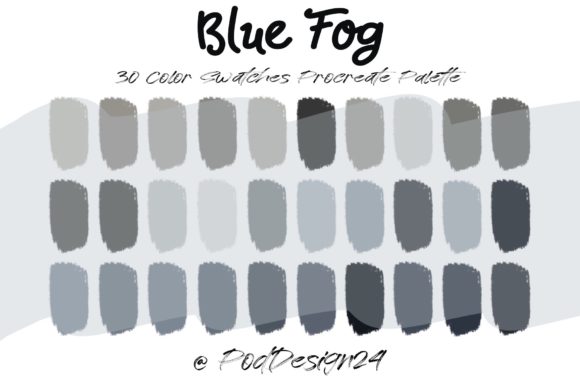
When an artist downloads this resource, they receive a ZIP file containing a dedicated swatch file compatible with Procreate. Inside, users will find 30 distinct colors meticulously arranged to facilitate the creation of foggy landscapes, underwater scenes, and winter atmospheres. Upon opening the file within the application, the palette integrates seamlessly into the interface, ready for immediate use. This immediacy allows creators to bypass the often time-consuming process of manually mixing hues to achieve the perfect degree of opacity and temperature associated with natural fog.
The Science of Cool Tones in Digital Environments
Understanding why a specific palette like Blue Fog is effective requires a look into color theory and atmospheric perspective. In the physical world, objects further away from the viewer appear lighter, less saturated, and cooler in tone due to the scattering of light by particles in the air. This phenomenon, known as aerial perspective, is crucial for creating the illusion of depth in a two-dimensional space. A generic blue scale often fails to capture the nuance required for realistic fog because it lacks the subtle shifts in value and temperature that occur as density changes.
The 30 colors included in this palette are engineered to mimic these natural gradients. They range from deep, saturated indigos that represent the core of a shadowed mist to pale, almost white cyans that suggest the breaking of light through dense vapor. By providing a pre-calibrated spectrum, the palette ensures that the transition from foreground to background feels organic. For researchers studying visual perception or educators teaching digital painting fundamentals, this tool serves as a practical example of how limited color ranges can enforce discipline and enhance compositional clarity.
Furthermore, the "fog" aesthetic is not limited to literal weather effects. In user interface design and branding, soft blue gradients are frequently employed to evoke feelings of trust, calmness, and technological sophistication. Business owners and designers utilizing these swatches can apply them to create backgrounds that do not compete with foreground content, ensuring readability while maintaining a modern, clean aesthetic. The versatility of these shades makes them applicable across various industries, from game development to architectural visualization.
Workflow Integration and Technical Compatibility
One of the primary advantages of using a dedicated swatch file is the reduction of friction in the creative process. When working on complex illustrations, constantly adjusting the color wheel can disrupt the flow state. With the Procreate Color Palette Blue Fog installed, artists can focus entirely on brushwork and composition. The palette appears directly in the color panel, allowing for rapid switching between tones without breaking concentration. This efficiency is particularly valuable for professionals working under tight deadlines or those producing series of images that require a unified visual language.
It is essential to note the technical requirements for utilizing this resource effectively. The product is delivered as a ZIP file, which must be uncompressed before use. Once extracted, the contained swatch file is imported directly into Procreate. Users should verify that their software is updated to a version that supports external palette imports to avoid compatibility issues. While the file is optimized for iPadOS, the principles of the color selection remain relevant for creators working in other digital environments who may wish to manually replicate the hex values for cross-platform projects.
Annotation and organization within the digital workspace are also enhanced by using standardized palettes. When collaborating with other artists or handing off files to clients, having a named, consistent palette ensures that everyone is working from the same color foundation. This reduces the risk of color drift, where slight variations in manual mixing lead to inconsistencies across different layers or frames in an animation. For educational settings, instructors can distribute this palette to students to ensure that grading and feedback are focused on technique rather than color choice discrepancies.
Practical Applications Across Creative Disciplines
The utility of the Blue Fog palette extends far beyond simple landscape painting. Game developers, for instance, can utilize these 30 colors to create environment concept art that establishes the mood of a level before any 3D modeling begins. The specific tonal values help in defining lighting conditions, such as early morning mist or the gloomy atmosphere of a fantasy dungeon. By testing these colors in 2D sketches, teams can make informed decisions about lighting engines and texture maps later in the production pipeline.
In the realm of character design, these cool tones serve as excellent secondary colors for clothing, armor, or magical effects. A character draped in fabrics matching the lighter end of the fog spectrum will naturally recede slightly against a darker background, helping to separate figures in a busy scene. Conversely, using the deeper blues for shadows on a character can ground them in the environment, making them feel like an integral part of the world rather than a sticker placed on top. This interplay between character and environment is a hallmark of professional-grade illustration.
Architectural visualizers also benefit from this specific range of blues. When rendering exterior views of buildings, atmospheric haze is often added to convey scale and distance. Using a haphazard selection of blues can result in an unnatural, muddy look. The curated progression in this palette allows for the precise layering of atmospheric effects, ensuring that the building remains the focal point while the surrounding air adds necessary depth. This attention to detail can significantly impact how potential clients perceive a project's realism and viability.
Maximizing the Potential of the 30-Color Spectrum
While 30 colors may seem like a limited selection compared to the millions available in a standard color picker, this constraint is actually a feature. It forces the artist to think critically about value relationships rather than relying on endless hue shifting. To get the most out of the Procreate Color Palette Blue Fog, creators should experiment with blending modes. Overlaying these flat swatches with textured brushes can create complex, multi-layered effects that simulate the particulate nature of real fog.
Artists are encouraged to use the mid-tones in the palette for base layers and reserve the extremes—the darkest indigos and the lightest near-whites—for highlighting and shadowing. This approach creates a high-contrast image that retains the soft, diffused quality of fog. Additionally, combining these blues with complementary warm tones, such as soft oranges or yellows (perhaps from a different palette), can create striking visual interest. The cool blue fog acts as a neutral canvas that makes warm light sources, like streetlamps or sunrises, pop with intensity.
For those interested in animation, this palette provides a consistent framework for frame-by-frame work. Maintaining color consistency across hundreds of frames is a daunting task; having a locked palette eliminates one variable from the equation. Animators can focus on the movement of the fog itself, knowing that the color integrity will remain stable throughout the sequence. This stability is crucial for maintaining the immersive quality of motion graphics and short films.
Considerations for Long-Term Asset Management
As digital libraries grow, organizing assets becomes increasingly important. The Blue Fog palette should be stored in a dedicated folder within the user's cloud storage or local drive, alongside other thematic palettes. Naming conventions matter; clearly labeling the file ensures it can be retrieved quickly for future projects that match its aesthetic. For business owners managing a team of designers, establishing a central repository for approved palettes helps maintain brand consistency across all marketing materials and digital products.
It is also worth considering the longevity of these color choices. While trends in digital art shift, the fundamental physics of light and atmosphere do not. A palette based on natural phenomena like fog possesses a timeless quality that prevents artwork from looking dated too quickly. Unlike neon or highly saturated trendy colors that may fall out of favor, muted blues and grays remain staples in serious illustration and design. Investing time in mastering a tool like this yields long-term dividends in the quality and relevance of an artist's portfolio.
Ultimately, the value of the Procreate Color Palette Blue Fog lies in its ability to translate a complex natural phenomenon into a usable, digital format. It empowers users to create evocative, depth-rich imagery without getting bogged down in technical color mixing. Whether used by a student learning the basics of atmospheric perspective, a professional concept artist drafting a new world, or a designer crafting a serene user interface, this tool offers a reliable foundation for creative expression. By integrating these 30 carefully selected swatches into their workflow, creators can elevate the atmospheric quality of their work, ensuring that every piece resonates with the intended emotional weight and visual clarity.