Mastering Starry Night Colors in Procreate
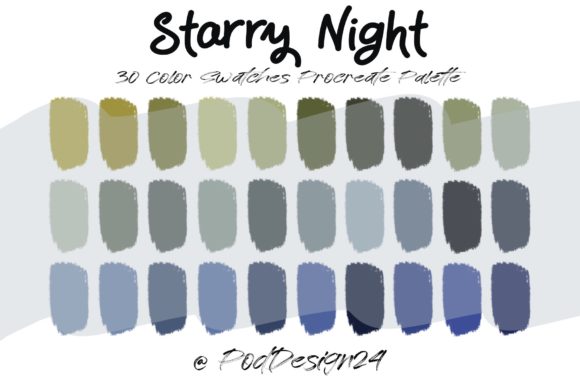
There is a distinct moment in the creative process where technical friction stalls artistic flow. You have a clear vision of a mood—perhaps the swirling, luminous depth of a nocturnal sky—but you find yourself hovering over the color wheel, mixing hues that feel slightly off. This hesitation breaks concentration and dilutes the emotional impact of the piece. For digital artists using Procreate on iPad, overcoming this hurdle often comes down to having the right foundational tools ready before the first stroke is made. The Procreate Color Palette Starry Night offers a curated solution to this common challenge, providing a pre-engineered set of thirty colors designed to replicate the complex interplay of light and shadow found in iconic impressionist works.
This collection is not merely a list of hex codes; it is a workflow accelerator. When you download the ZIP file containing the specific swatch file, you are importing a decision-making framework directly into your canvas. Upon opening the file in Procreate, your palette is instantly populated with thirty distinct shades ranging from deep indigos and midnight blues to vibrant yellows and soft, hazy whites. This immediate availability allows you to bypass the trial-and-error phase of color theory and move straight into execution. For professionals ranging from freelance illustrators to marketing content creators, this efficiency translates directly into billable hours saved and faster project turnaround times.
Streamlining the Creative Workflow
The primary value of integrating a specialized palette like Procreate Color Palette Starry Night lies in its ability to standardize quality while reducing cognitive load. In a professional setting, consistency is key. Whether you are an educator creating visual aids, a blogger designing custom headers, or a small business owner developing brand assets, maintaining a cohesive aesthetic across different pieces of content is vital. By utilizing a fixed set of thirty colors, you ensure that every illustration, sketch, or design element shares a unified tonal language.
Consider the scenario of a social media manager tasked with creating a week's worth of evening-themed posts. Without a preset palette, each image might suffer from slight variations in blue tones or yellow highlights, making the grid look disjointed. With this swatch file loaded, the artist selects from the same thirty options for every graphic. The result is a visually harmonious feed that communicates professionalism and attention to detail. The time previously spent manually sampling colors or adjusting saturation sliders is redirected toward composition, storytelling, and refining textures.
Furthermore, these palettes serve as an excellent educational tool for those looking to understand color harmony. By observing how the thirty included colors interact when layered or blended in Procreate, hobbyists and students can learn advanced techniques regarding complementary contrasts and analogous schemes. The palette acts as a guide, showing rather than telling how warm lights can pop against cool shadows to create depth without relying on black outlines.
Practical Applications Across Industries
The utility of this digital asset extends far beyond fine art replication. While the inspiration is drawn from classic imagery, the application is modern and versatile. Publishers can use these tones to create evocative book covers or chapter headers that suggest mystery and wonder. Entrepreneurs launching products related to sleep, relaxation, or astronomy can leverage these specific hues to build branding materials that subconsciously evoke calmness and night-time tranquility.
For freelancers, offering clients a "starry night" theme becomes significantly easier when the groundwork is already laid. Instead of starting from scratch, you can present mockups rapidly, demonstrating competence and speed. This capability strengthens client communication, as you can focus discussions on layout and messaging rather than defending basic color choices. The palette simplifies decisions, allowing both the creator and the client to visualize the final product sooner in the development cycle.
Even in corporate presentations or internal communications, the right color scheme can enhance engagement. A slide deck discussing future goals or "night shifts" in operations can benefit from the sophisticated, non-distracting elegance of this palette. It moves the presentation away from generic corporate templates toward something custom and thoughtful, thereby improving the overall reception of the information being presented.
Technical Compatibility and Usage Guidelines
To derive maximum benefit from this resource, it is essential to approach the acquisition and installation process with due diligence. The product is delivered as a ZIP file which, once downloaded, must be extracted to access the Procreate swatch file. It is crucial to verify that your device and software version are compatible before proceeding. This digital tool is designed specifically for the Procreate ecosystem on iPad; attempting to use it in other raster or vector programs without conversion may yield unexpected results.
Once the file is opened in Procreate, the thirty colors appear in your library, ready for immediate use. However, users must adhere to strict licensing terms to maintain the integrity of the digital marketplace. The license explicitly states that the product cannot be resold as a digital download. This means you cannot purchase the file and then list the swatch file itself on your own website or marketplace for others to buy. The value lies in your application of the colors within your unique creative works, not in redistributing the tool itself.
Additionally, sharing the product with others outside of your licensed usage is prohibited. This restriction protects the intellectual property of the creator, PodDesign24, ensuring they can continue to produce high-quality resources. It is also important to note that refunds are not available on digital downloads. Because the file can be instantly accessed and copied, the nature of the transaction prevents returns once the download is complete. Therefore, potential buyers should carefully review their needs and device compatibility prior to purchase to ensure the tool fits their specific workflow requirements.
Making the Right Choice for Your Projects
While the Procreate Color Palette Starry Night offers significant advantages, it is not a one-size-fits-all solution for every artistic endeavor. If your project requires neon cyberpunk aesthetics or pastel spring themes, this specific range of deep blues and radiant yellows may not align with your goals. It is always wise to compare your project brief against the available tones in the swatch file. Reviewing the included colors to see if they match your intended mood is a prudent step before integration.
However, for projects demanding atmosphere, depth, and a touch of classical beauty, this palette is an invaluable asset. It bridges the gap between amateur experimentation and professional execution. By removing the guesswork from color selection, it empowers creators to focus on what truly matters: the story they are telling and the emotions they are evoking. Whether you are a seasoned illustrator or a marketer dipping your toes into digital design, having a reliable, pre-curated set of colors can be the difference between a good draft and a masterpiece.
In conclusion, the adoption of specialized tools like this swatch file represents a mature approach to digital creation. It acknowledges that creativity thrives best when constraints are managed effectively. By limiting your initial choices to thirty harmonious colors, you paradoxically expand your creative potential, freeing your mind to explore composition and narrative. As you integrate these tools into your routine, remember to respect the licensing agreements that keep the creator economy functioning, and enjoy the seamless, inspired workflow that follows.